Space & Science

News and insights from NASA, ESA, and the frontier of space exploration and scientific discovery.

iss073e0575226orig

A Robotic Helping Hand

NASA astronaut Jonny Kim took this photo on July 23, 2025, as the International Space Station orbited 259 miles above a cloudy Pacific Ocean southwest of Mexico. Visible in the image is the 57.7-foot-long Canadarm2 robotic arm, which extends from a data grapple fixture on the International Space Station’s Harmony module. Attached to its latching end effector is Dextre, the station’s fine-tuned robotic hand designed for delicate external maintenance tasks. Station crew use Canadarm2 to perform maintenance tasks, capture visiting spacecraft, and move supplies, equipment, and even astronauts.
On Nov. 2, 2025, the space station reached 25 years of continuous human presence. The orbital lab remains a training and proving ground for deep space missions, enabling NASA to focus on Artemis missions to the Moon and Mars.
Image credit: NASA/Jonny Kim

A Robotic Helping Hand Read More »

space image

Blue Origin launches New Glenn rocket to Mars after delays

NEWYou can now listen to Fox News articles!
Blue Origin’s New Glenn Mission NG-2 launched a second mission from Cape Canaveral Thursday, carrying NASA’s twin ESCAPADE spacecraft to Mars.The spacecraft is expected to reach the Red Planet by 2027.The launch was previously delayed due to extreme solar activity and bad weather.This launch is to support ESCAPADE’s science objectives as the twin spacecraft progress on their journey to the Red Planet. UFO MANIA GRIPS SMALL TOWN AFTER MYSTERIOUS GLOWING OBJECT SIGHTING GOES VIRALAlso onboard is a technology demonstration from Viasat in support of NASA’s Communications Services Project.United Launch Alliance is also said to be targeting a nighttime launch from Cape Canaveral Space Force Station.Its Atlas V rocket will lift off from Space Launch Complex 41 at 10:04 p.m. EST, carrying a ViaSat broadband satellite. ULA’s mission had been delayed twice last week due to a vent valve issue with its booster’s liquid-oxygen tank.CLICK HERE TO DOWNLOAD THE FOX NEWS APPIf both launches are successful, they will mark the ninety-fifth and ninety-sixth launches of the year on Florida’s Space Coast bringing the region closer to a record 100 launches in 2025.The milestone follows SpaceX’s Starlink mission earlier this month, which set a new annual record.

Blue Origin launches New Glenn rocket to Mars after delays Read More »

iPhone

Never forget to reply to an email again with hidden phone trick that actually works

NEWYou can now listen to Fox News articles!
If you’ve ever told yourself you’d reply to an email later and then forgot, there’s a simple fix built right into your phone. iPhone and Android users both have ways to set reminders that bring messages back to your attention at the perfect time. Whether you use Apple’s Mail app or Gmail on Android, these features help you stay organized, reduce stress and never miss an important reply again.Why the message reminder feature mattersMany people leave emails unread as a reminder to reply later, but that method often fails. The built-in Mail reminder gives you a clear alert at a time you choose. It helps you follow through on tasks, maintain better communication and avoid missed opportunities.WHY IPHONE USERS ARE THE NEW PRIME SCAM TARGETS Reminders can be set in the iPhone Mail app to ensure you don’t miss an email. (REUTERS/Thomas Peter/File Photo)To make sure you can use this feature, update your iPhone to the latest iOS version. Here’s how:Open Settings.Tap General.Select Software Update.If an update is available, tap Download and Install.Sign up for my FREE CyberGuy ReportGet my best tech tips, urgent security alerts and exclusive deals delivered straight to your inbox. Plus, you’ll get instant access to my Ultimate Scam Survival Guide – free when you join my CYBERGUY.COM newsletter.If you’re on Android, you’ll also want to make sure your Gmail app and system software are up-to-date so the Snooze feature runs smoothly. Here’s how:Settings may vary depending on your Android phone’s manufacturerOpen the Google Play Store.Tap your profile icon in the upper right corner.Select Manage apps and device.Tap Update all or locate Gmail and tap Update.To check your Android version, open Settings > About phone > Android version.5 HIDDEN BATTERY DRAINERS YOU CAN FIX RIGHT NOWKeeping your phone updated ensures you have the newest tools, features, and security improvements.How to set up a reminder in the Mail app on iPhone Open the Mail app.Find the email you want to be reminded about and swipe right on it.Tap Remind Me.Choose a preset time or tap Remind Me Later to pick your own.Select the date and time that fits your schedule and tap the check mark in the upper right corner of the screen.That’s it. When the time comes, you’ll get a fresh notification as if you just received the email again. It’s a great way to stay organized without using third-party apps. iPhone and Android users can set built-in email reminders to manage messages and stay organized through Apple’s Mail and Gmail apps. (Sean Gallup/Getty Images)10 IOS 26 TRICKS THAT HELP YOU GET MORE OUT OF YOUR IPHONEHow to cancel a reminder early in the Mail app on iPhone If you’ve already handled the message and no longer need the alert, you can end it early:Open the Mail app and go to Mailboxes.Tap Remind Me.Swipe left on the email you want to remove.Tap Clear to cancel the reminder.This prevents duplicate notifications and keeps your inbox tidy.Android users can do this, tooIf you’re on Android, you can set up a similar email reminder using Gmail’s built-in Snooze feature. It works much like Apple’s Mail reminder. Instead of choosing “Remind Me,” Gmail lets you snooze an email so it pops back to the top of your inbox later, right when you want to deal with it.5 SOCIAL MEDIA SAFETY TIPS TO PROTECT YOUR PRIVACY ONLINEHow to snooze an email in Gmail on Android Settings may vary depending on your Android phone’s manufacturerOpen the Gmail app on your Android phone.Tap and hold the email you want to be reminded about.Tap the three dots in the upper right corner or the clock icon at the top.Select Snooze.Choose a preset time or tap Pick date & time to set a custom reminder.When the time arrives, Gmail automatically moves the message back to the top of your inbox and marks it unread so it stands out.BEST WAYS TO TRACK YOUR MEDS ON IPHONE AND ANDROIDHow to cancel a snooze quickly in Gmail on Android If you change your mind before the reminder triggers, you can easily cancel it:Settings may vary depending on your Android phone’s manufacturerOpen the Gmail app.Tap the Menu icon (three lines) in the top left corner.Select Snoozed.Find the email and swipe it left or right, or open it and tap Unsnooze.Your email will return to its original spot in the inbox right away, so you can handle it or leave it as is. Built-in reminder features on iPhone and Android help users follow up on emails and prevent missed messages. (Cyberguy.com)What this means for youIf you manage a busy inbox, this feature can be a game-changer. It helps reduce mental clutter since you won’t have to rely on memory or endless email flags. You decide when you want to be reminded, and your phone takes care of the rest.Take my quiz: How safe is your online security?Think your devices and data are truly protected? Take this quick quiz to see where your digital habits stand. From passwords to Wi-Fi settings, you’ll get a personalized breakdown of what you’re doing right and what needs improvement. Take my Quiz here: Cyberguy.com.Kurt’s key takeawaysWhether you’re using an iPhone or Android device, built-in email reminders can keep your digital life running smoothly. These features help you manage your inbox with less effort and more control. By setting a time to follow up, you stay productive and avoid letting key emails slip through the cracks. Both platforms make it easy to stay focused and keep your conversations on track.CLICK HERE TO DOWNLOAD THE FOX NEWS APPWould a reminder like this have saved you from missing an important email recently? Let us know by writing to us at Cyberguy.com.Sign up for my FREE CyberGuy ReportGet my best tech tips, urgent security alerts and exclusive deals delivered straight to your inbox. Plus, you’ll get instant access to my Ultimate Scam Survival Guide – free when you join my CYBERGUY.COM newsletter.Copyright 2025 CyberGuy.com.  All rights reserved.  

Never forget to reply to an email again with hidden phone trick that actually works Read More »

2 how to easily transfer files and photos off of a computer to your hard drive

Apple passkey technology transforms Mac security with biometric authentication, encrypted storage

NEWYou can now listen to Fox News articles!
Your Mac holds a lot more than just files. It carries your personal information, payment data, messages and every online account you access. Keeping that information safe starts with how you sign in. For years, passwords have been the standard way to protect accounts, but they are also one of the weakest links in digital security. They can be guessed, stolen or reused across multiple sites.Apple’s introduction of passkeys marks a major step forward. Instead of relying on something you need to remember, passkeys rely on something you have (your trusted Apple device) and something you are, like your fingerprint or face. Together with iCloud Keychain and two-factor authentication, passkeys create a seamless and much safer way to secure your Mac and your digital life.What are passkeys?Passkeys are a modern alternative to passwords. They use public key cryptography to let you sign in without ever creating or typing a password. When you register for an account using a passkey, your Mac creates two unique keys. One is public and stored by the website or app, and the other is private and stays securely on your device.The public key is not sensitive information. The private key, on the other hand, never leaves your Mac and is protected behind your device’s security features. When you sign in, Touch ID or Face ID confirms your identity before your Mac uses the private key to authenticate you. This process prevents phishing and password leaks because no shared secret is ever transmitted to the website.Sign up for my FREE CyberGuy ReportGet my best tech tips, urgent security alerts and exclusive deals delivered straight to your inbox. Plus, you’ll get instant access to my Ultimate Scam Survival Guide — free when you join my CYBERGUY.COM newsletter.HOW TO USE PASSKEYS TO KEEP YOUR COMPUTER SAFE A passkey on your Mac replaces passwords with a faster, more secure way to sign in. (Kurt “CyberGuy” Knutsson)How Apple keeps passkeys securePasskeys are stored and synced across your devices through iCloud Keychain, which is protected by end-to-end encryption. This means that not even Apple can access your passkeys or passwords. iCloud Keychain also has built-in protection against brute force attacks, even if someone were to gain unauthorized access to Apple’s servers.If you lose your devices, you can still recover your passkeys through iCloud Keychain recovery. To do this, you must sign in with your Apple ID and password, verify your identity with a code sent to your trusted number and confirm using your device passcode. The system limits the number of attempts, and if too many failed attempts occur, the recovery record is locked or destroyed to prevent misuse.You can also set an account recovery contact to make sure you never lose access, even if you forget your Apple ID password or device passcode. This multi-layered design ensures that your data remains secure even in extreme scenarios, such as a compromised Apple account or cloud breach.How to set up passkeys on your MacSetting up passkeys is simple and requires iCloud Keychain to be enabled.Choose the Apple menu, then select System Settings.Click your name, then click iCloud.Click Passwords. In macOS Sonoma or earlier, click Passwords & Keychain.Click Sync this Mac, then click Done.When you sign up for a website or app that supports passkeys, you’ll now see the option to create a passkey.If your Mac has Touch ID, place your finger on the sensor to confirm.If you are using an iPhone or iPad nearby, select Other Options and scan the QR code shown on your Mac to confirm with Face ID.You can also replace an existing password by visiting the account settings of a supported website or app and selecting the option to switch to a passkey.Once created, your passkeys are automatically stored in iCloud Keychain and available on all devices signed in with the same Apple ID.Major services that support passkeysPasskey adoption is growing quickly across major tech platforms. As of now, many of the biggest online services already let you sign in without a password.Some of the key ones include:GoogleMicrosoftAppleAmazonPayPalGitHubUbereBayWhatsAppFacebookSupport for passkeys continues to expand every month as more companies integrate the technology into their login systems. On most of these platforms, you can now create new accounts or switch your existing ones to passkeys for faster, more secure sign-ins. Each passkey is unique to your account and safely stored in your device’s iCloud Keychain. (iStock)6 additional steps to keep your Mac safePasskeys add a strong layer of protection, but good security habits still matter. Here are more steps to strengthen your Mac’s defenses. 1) Enable two-factor authenticationTwo-factor authentication (2FA) adds another layer of protection to your Apple ID. It works by requiring two forms of verification: your password and a one-time code sent to a trusted device or phone number. This means that even if someone somehow gets your password, they still cannot access your account without also having your device.10 WAYS TO SECURE YOUR OLDER MAC FROM THREATS AND MALWARE2) Review your trusted devices and numbersRegularly check which devices and phone numbers are linked to your Apple ID. On your Mac, click the Apple icon in the upper left of the screen. Then go to System Settings → Apple ID → Devices and remove anything you don’t recognize. Make sure your trusted phone number is still current, since it’s critical for account recovery.3) Use a password managerEven though passkeys are replacing passwords, many sites still rely on traditional logins. A password manager helps you create, store and fill in unique passwords for every account. iCloud Keychain can do this automatically across all your Apple devices, but if you want more flexibility, you might want to consider a third-party password manager.Next, see if your email has been exposed in past breaches. Our No. 1 password manager pick includes a built-in breach scanner that checks whether your email address or passwords have appeared in known leaks. If you discover a match, immediately change any reused passwords and secure those accounts with new, unique credentials. Check out the best expert-reviewed password managers of 2025 at Cyberguy.com.4) Be wary of phishing attempts and install strong antivirus softwarePhishing remains one of the most common ways attackers try to steal personal information. They may send fake emails or messages pretending to be from Apple or other trusted companies, urging you to click links or provide login details. Always double-check the sender’s address and avoid clicking on links that seem suspicious. Instead, visit the website directly by typing the address into your browser.While macOS has strong built-in defenses such as Gatekeeper and XProtect, installing strong antivirus software adds another layer of protection against malware, adware and potentially unwanted programs. Strong antivirus software continuously monitors your system for suspicious behavior and can alert you to threats before they cause damage. It is especially useful if you download files from outside the App Store or connect external drives frequently.The best way to safeguard yourself from malicious links that install malware, potentially accessing your private information, is to have strong antivirus software installed on all your devices. This protection can also alert you to phishing emails and ransomware scams, keeping your personal information and digital assets safe.Get my picks for the best 2025 antivirus protection winners for your Windows, Mac, Android and iOS devices at Cyberguy.com. Using a passkey with Touch ID or Face ID keeps your information protected from phishing and leaks. (Kurt “CyberGuy” Knutsson)5) Turn On FileVault disk encryptionFileVault protects everything stored on your Mac by encrypting the entire hard drive. That means if your computer is ever lost or stolen, your data stays locked away from prying eyes. Go to System Settings → Privacy & Security → FileVault to enable it.6) Keep macOS updated automaticallyApple regularly releases software updates that include important security patches. Cybercriminals often target outdated systems because they contain known vulnerabilities. By keeping macOS and your apps up to date, you make it harder for attackers to exploit weaknesses. To make this effortless, turn on Automatic Updates under System Settings → General → Software Update → Automatic Updates.7) Back up with time machineBacking up your Mac is just as important as protecting it. Time Machine automatically backs up your files to an external drive or network disk, keeping your data safe from ransomware, hardware failure or accidental deletion. Make sure your backup drive is encrypted for extra protection.HOW A SINGLE MACBOOK COMPROMISE SPREAD ACROSS A USER’S APPLE DEVICES8) Use a data removal serviceEven with passkeys, your personal information can still be exposed through data broker sites that collect and sell your details. Using a data removal service can help remove your private data from hundreds of these sites automatically. It’s an effective way to reduce your online footprint and protect your identity, especially when combined with Apple’s built-in security tools.While no service can guarantee the complete removal of your data from the internet, a data removal service is really a smart choice. They aren’t cheap, and neither is your privacy. These services do all the work for you by actively monitoring and systematically erasing your personal information from hundreds of websites. It’s what gives me peace of mind and has proven to be the most effective way to erase your personal data from the internet. By limiting the information available, you reduce the risk of scammers cross-referencing data from breaches with information they might find on the dark web, making it harder for them to target you.Check out my top picks for data removal services and get a free scan to find out if your personal information is already out on the web by visiting Cyberguy.com.Get a free scan to find out if your personal information is already out on the web: Cyberguy.com.CLICK HERE TO DOWNLOAD THE FOX NEWS APPKurt’s key takeawayPasswords have served us for decades, but they are no longer enough to protect our digital identities. Passkeys make signing in faster, easier and significantly more secure by removing the weaknesses of traditional passwords. Combined with Apple’s encryption, iCloud Keychain and two-factor authentication, they represent one of the safest ways to protect your Mac and everything on it.Have you tried using passkeys yet on your Mac, and what was your experience like? Let us know by writing to us at Cyberguy.com.Sign up for my FREE CyberGuy ReportGet my best tech tips, urgent security alerts and exclusive deals delivered straight to your inbox. Plus, you’ll get instant access to my Ultimate Scam Survival Guide — free when you join my CYBERGUY.COM newsletter.Copyright 2025 CyberGuy.com.  All rights reserved.  

Apple passkey technology transforms Mac security with biometric authentication, encrypted storage Read More »

2 ai powered scams target kids while parents stay silent

AI-powered scams target kids while parents stay silent

NEWYou can now listen to Fox News articles!
Kids are spending more time online than ever, and that early exposure is opening the door to a new kind of danger. Artificial intelligence has supercharged online scams, creating personalized and convincing traps that even adults can fall for. The latest Bitwarden “Cybersecurity Awareness Month 2025” poll shows that while parents know these risks exist, most still haven’t had a serious talk with their children about them. This growing communication gap is leaving the youngest internet users vulnerable at a time when online safety depends more than ever on education and oversight.Young children face real risks onlineChildren as young as preschool age are now part of the connected world, yet few truly understand how to stay safe. The Bitwarden survey found that 42% of parents with children between three and five years old said their child had accidentally shared personal information online.Sign up for my FREE CyberGuy ReportGet my best tech tips, urgent security alerts and exclusive deals delivered straight to your inbox. Plus, you’ll get instant access to my Ultimate Scam Survival Guide — free when you join my CYBERGUY.COM newsletter.5 PHONE SAFETY TIPS EVERY PARENT SHOULD KNOW AI-powered scams are finding new ways to reach kids who go online earlier than ever. (Kurt “CyberGuy” Knutsson)Nearly 80% of kids between the ages of three and twelve already have their own tablet or another connected device. Many parents assume supervision software or family settings are enough, but that assumption breaks down when kids explore apps, games and chat spaces designed to hold their attention. Device access has become nearly universal by early elementary school, but meaningful supervision and honest safety conversations are lagging behind.The AI threat and the parental disconnectArtificial intelligence has changed the nature of online scams by making them sound familiar, personal and hard to recognize. Bitwarden’s data shows that 78% of parents worry their child could fall for an AI-enhanced threat, such as a voice-cloned message or a fake chat with a friend. Despite that fear, almost half of those same parents haven’t talked with their kids about what an AI-powered scam might look like. The disconnect is even stronger among Gen Z parents. About 80% of them say they are afraid their child will fall victim to an AI-based scheme, yet 37% allow their kids full or nearly full autonomy online. In those households, problems are more common. Malware infections, unauthorized in-app purchases and phishing attempts appear at the highest rates among families who worry the most but monitor the least. The paradox is clear. Parents recognize the threat but fail to translate awareness into consistent action.Why parents haven’t had the talkThere are many reasons this important talk keeps getting delayed. Some parents simply feel unprepared to explain AI, while others assume their existing safety tools will protect their children. Only 17% of parents in the United States actively seek information about AI technologies, according to related research by Barna Group. That leaves a large majority relying on partial knowledge or outdated advice. Many parents also juggle multiple devices at home, making it difficult to track every app or game their child uses. Some overestimate how safe their own habits are, even though they admit to reusing passwords or skipping security updates. Without firsthand understanding or personal discipline, it becomes even harder to teach those lessons to children. As a result, many kids face the internet with curiosity but without proper guidance.Smart ways to protect your child onlineThe Bitwarden findings make one thing clear: kids are getting connected younger, and scams powered by artificial intelligence are already targeting them. The good news is that parents can take practical steps right now to reduce those risks and build lasting online safety habits.1) Keep devices where you can see themSet up tablets, laptops and gaming consoles in shared family areas rather than bedrooms. When screens stay visible, you naturally become part of your child’s online world. This not only encourages open conversation but also helps spot suspicious messages, fake friend requests or scam links before they cause trouble. Staying involved in your child’s digital life is the best defense against today’s AI threats. (Kurt “CyberGuy” Knutsson)2) Use built-in parental controlsMost devices have strong tools you can activate in minutes. Apple’s Screen Time and Google Family Link let you limit screen time, approve new app installs and monitor how long your child spends on specific apps. These controls are especially useful for younger kids who, according to the Bitwarden poll, often have little supervision despite heavy device use.TEENS TURNING TO AI FOR LOVE AND COMFORT3) Talk through every downloadBefore your child installs a new game or app, take a moment to check it together. Read the reviews, look at what data it collects and confirm the developer’s name. Explain why some games or “free” apps might ask for camera or contact access they don’t need. This kind of shared review teaches healthy skepticism and helps children recognize red flags later on.4) Make password strength and 2FA a family ruleAI scams thrive on weak or reused passwords. Use a password manager to create and store strong, unique logins for each account. Turn on two-factor authentication (2FA) wherever possible so that even if a password is stolen, the account stays protected. Let your kids see how you use these tools so they learn that security isn’t complicated, it’s just a habit. Many parents delay important online safety talks because they feel unprepared to explain AI, leaving kids curious but without the guidance they need to stay safe. (Kurt “CyberGuy” Knutsson)Next, see if your email has been exposed in past breaches. Our No. 1 password manager pick includes a built-in breach scanner that checks whether your email address or passwords have appeared in known leaks. If you discover a match, immediately change any reused passwords and secure those accounts with new, unique credentials. Check out the best expert-reviewed password managers of 2025 at Cyberguy.com.5) Teach them to stop and tellOne of the best defenses is simple: encourage your child to pause and talk before reacting to anything unusual online. Whether it’s a pop-up claiming a prize, a strange link in a chat or a voice message that sounds familiar, remind them it’s always okay to ask you first. Quick conversations like these can prevent costly mistakes and turn learning moments into trust-building ones.6) Keep devices updated and use strong antivirus softwareOutdated software can leave gaps that scammers exploit. Regularly update operating systems, browsers and apps to close those holes. Add strong antivirus software. Explain to your child that updates and scans keep their favorite games and videos running safely, not just their parents happy.The best way to safeguard from malicious links that install malware, potentially accessing private information, is to have strong antivirus software installed on all your devices. This protection can also alert you to phishing emails and ransomware scams, keeping your personal information and digital assets safe.Get my picks for the best 2025 antivirus protection winners for your Windows, Mac, Android and iOS devices at Cyberguy.com.7) Make online safety part of everyday lifeDon’t save these conversations for when something goes wrong. Bring them up casually during family time or when watching YouTube or gaming together. Treat digital safety like any other life skill, something practiced daily and improved with time. The more normal it feels, the more confident your child becomes when facing online risks. Talking about online safety early helps build trust and awareness before trouble starts.  (Kurt “CyberGuy” Knutsson)What this means for youIf you are a parent, guardian or anyone helping a child use technology, this issue deserves your attention. Start talking early, even before your child begins exploring the web on their own. Teach them simple concepts like asking before clicking or sharing. Instead of relying only on parental controls, have ongoing conversations that help them recognize suspicious links, messages or pop-ups. Show them that cybersecurity isn’t about fear but about awareness. Model strong digital habits at home by using unique passwords and turning on two-factor authentication. Explain why those steps matter. When your child understands the reasoning behind the rules, they are more likely to follow them. Make technology part of your family routine rather than a private space your child navigates alone. Regularly check the apps they use and the people they interact with. Set clear expectations and age-appropriate boundaries that can grow with your child’s experience. Staying engaged is the most powerful protection you can offer.CLICK HERE TO DOWNLOAD THE FOX NEWS APPKurt’s key takeawaysThe numbers from Bitwarden show a clear warning sign. Concern among parents is high, yet actual conversations about AI-powered scams remain rare. That silence gives scammers the upper hand. Children who learn about online safety early are more confident, more cautious and better equipped to handle unexpected messages or fake alerts. It only takes a few minutes of honest conversation to create awareness that lasts for years. By taking action now, you can close the gap between fear and understanding, protecting your family in a digital world that changes every day.Are you ready to start the conversation that could keep your child from becoming the next target of an AI-powered scam? Let us know by writing to us at Cyberguy.com.Sign up for my FREE CyberGuy ReportGet my best tech tips, urgent security alerts and exclusive deals delivered straight to your inbox. Plus, you’ll get instant access to my Ultimate Scam Survival Guide — free when you join my CYBERGUY.COM newsletter.Copyright 2025 CyberGuy.com.  All rights reserved.

AI-powered scams target kids while parents stay silent Read More »

1 google chrome autofill now handles ids

Google Chrome autofill now handles IDs

NEWYou can now listen to Fox News articles!
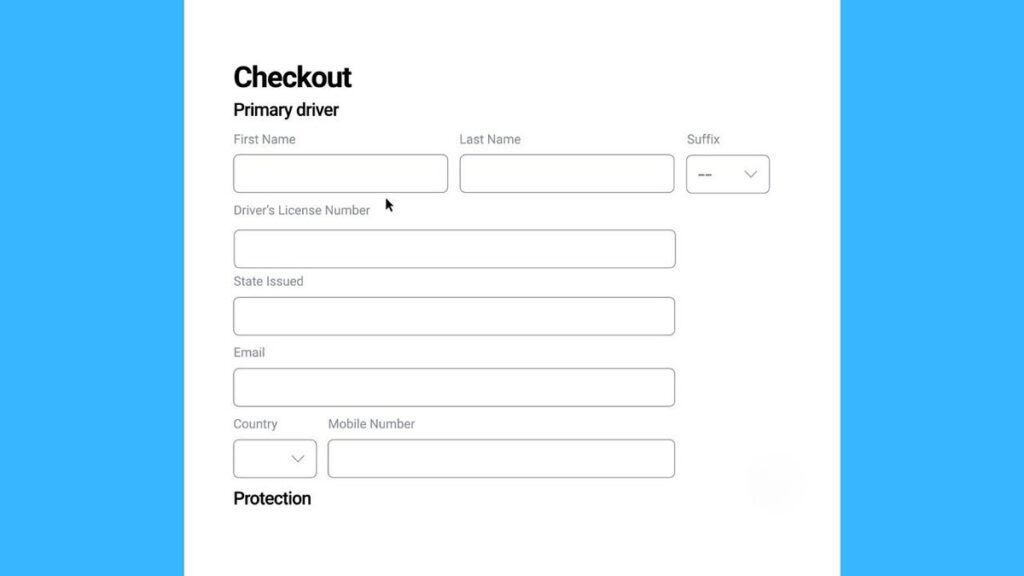
Google has made Chrome even more capable. The browser can now fill in your passport, driver’s license and vehicle registration automatically. This upgrade joins the list of time-saving autofill options that already include passwords, addresses and payment details.Desktop users with enhanced autofill enabled will start seeing the new options right away. Chrome can even interpret complex form layouts and varying formats across different websites, improving accuracy with every entry.Google says these new autofill features were designed with privacy in mind. This from a company which makes money off of capturing your most intimate details in life. Google says Chrome only saves sensitive data after you give permission. It also encrypts stored information so it’s unreadable to anyone without your authorization. Before any personal info is filled into a webpage, Chrome asks you to confirm — keeping you in control.UPDATE CHROME NOW: GOOGLE PATCHES NEW ZERO-DAY THREATSign up for my FREE CyberGuy ReportGet my best tech tips, urgent security alerts and exclusive deals delivered straight to your inbox. Plus, you’ll get instant access to my Ultimate Scam Survival Guide — free when you join my CYBERGUY.COM newsletter. Chrome’s enhanced autofill now saves and fills your passport, license and vehicle info with just a click. (Google)Still, autofill exploits by hackers have been known to happen. Infostealer malware has been used historically to capture data entered into web fields manually and with autofill. It is not perfect, but Google and others have come a long way to secure their browser. Keep in mind, Google may ask to share your information with third parties, so be cautious when you give it permission.Passport numbers, driver’s license details and other official records are valuable to cybercriminals, so be careful when you share them online. As always, use the strongest antivirus protection on all devices to ward off trouble. See my 2025 review of the best antivirus protection at Cyberguy.com.The company began rolling out these updates worldwide in all languages and plans to support even more document types soon. The Google Chrome browser encrypts personal data and always asks for confirmation before entering sensitive information. (Google)How to enable Enhanced Autofill in ChromeFor Windows and Mac (Desktop):Open Chrome on your computer.Click the three-dot menu in the top right.Click Settings.On the left pane, select Autofill & passwords (or simply “Autofill” depending on version).Click Enhanced autofill.Toggle On “Enhanced autofill” to allow Chrome to fill in IDs (passport, driver’s license, vehicle info).To enter or edit saved data: while still in the Enhanced autofill section, select Add/Edit under “Saved information” and input your document numbers or vehicle info.Next time you visit a supported form (e.g., for vehicle registration or passport number), Chrome will prompt you to fill it in and ask you to confirm before submitting it.OVER 2B USERS FACE PHISHING RISKS AFTER GOOGLE DATA LEAK You can enable Enhanced Autofill in Chrome settings to securely manage and store official identification data. (Kurt “CyberGuy” Knutsson)For iPhoneOpen Chrome on your iPhone or iPad.Tap the three-dot menu (bottom or top right) and select Settings.Go to Autofill & Payments (or similar label) and verify that “Addresses and More,” “Payment Methods” and “Passwords” are enabled for autofill.For AndroidSettings may vary depending on your Android phone’s manufacturer.Open Chrome on your Android device.Tap the three-dot menu (top right).Go to Settings → Autofill & payments (or simply “Autofill and forms”).Under “Addresses and more” (and possibly payment methods), enable the types of info you want filled in automatically.Note: The enhanced autofill update for passports, driver’s licenses and vehicle details is still expanding to mobile. You may not see it yet on iPhone or Android, even with the latest Chrome version. Keep your app updated and check back periodically as Google continues the global rollout.AI updates are driving Chrome forwardThis upgrade follows a wave of artificial intelligence-driven improvements in Chrome. Recently, Google added Gemini integration for all desktop users in the U.S. and previewed new “agentic” features that use AI to automate everyday tasks. Future updates will include password reset suggestions, smarter scam detection and AI-powered form assistance, all designed to make browsing safer and more convenient.CONGRESSIONAL BUDGET OFFICE HIT BY CYBERATTACK, RAISING CONCERNS OVER US GOVERNMENT NETWORK SECURITY The rollout of Enhanced Autofill continues worldwide, adding support for more ID types and expanding beyond desktop users. (Kurt “CyberGuy” Knutsson)Tips to keep your browser secureEven with encryption, there’s more you can do to protect what autofill stores.1) Use strong antivirus softwareInstall trusted antivirus software on all your devices. It blocks malware that could record your keystrokes or hijack autofill data before encryption kicks in.The best way to safeguard yourself from malicious links that install malware, potentially accessing your private information, is to have strong antivirus software installed on all your devices. This protection can also alert you to phishing emails and ransomware scams, keeping your personal information and digital assets safe.Get my picks for the best 2025 antivirus protection winners for your Windows, Mac, Android and iOS devices at Cyberguy.com.2) Use a password manager instead of browser storageDedicated password managers store and encrypt your logins locally, reducing risk if your browser gets compromised.Next, see if your email has been exposed in past breaches. Our No. 1 password manager pick includes a built-in breach scanner that checks whether your email address or passwords have appeared in known leaks. If you discover a match, immediately change any reused passwords and secure those accounts with new, unique credentials.Check out the best expert-reviewed password managers of 2025 at Cyberguy.com.3) Enable two-factor authentication (2FA)Pair your Google account with two-factor authentication (2FA). Even if hackers access your browser, they can’t reach your autofill data without your secondary code.4) Keep your browser and extensions cleanType chrome://extensions and remove anything unfamiliar. Malicious add-ons are a common way attackers steal autofill info.5) Use a data removal serviceEven with Chrome’s encryption, your personal information can still surface on data broker sites. A data removal service sends requests to these companies to delete your personal details, like your address, phone number and ID records, before they can be shared or sold. This lowers the risk of your data being used in phishing attempts or identity theft. Regularly clearing your digital footprint adds another layer of protection for Chrome’s autofill feature. It limits what hackers could use if they ever gain access through a breached website or browser extension.Check out my top picks for data removal services and get a free scan to find out if your personal information is already out on the web by visiting Cyberguy.com.Get a free scan to find out if your personal information is already out on the web: Cyberguy.com.6) Use a secure email for verificationIf Chrome requests confirmation, make sure your linked Google account uses a private, encrypted email provider.For recommendations on private and secure email providers that offer encrypted addresses, visit Cyberguy.com.Take my quiz: How safe is your online security?Think your devices and data are truly protected? Take this quick quiz to see where your digital habits stand. From passwords to Wi-Fi settings, you’ll get a personalized breakdown of what you’re doing right and what needs improvement. Take my Quiz here: Cyberguy.com.CLICK HERE TO DOWNLOAD THE FOX NEWS APPKurt’s key takeawaysChrome’s latest autofill update blends convenience with stronger safeguards. But security still depends on your habits. Taking a few extra minutes to manage extensions, enable 2FA and use privacy tools will go a long way toward keeping your personal data safe.Would you trust your passport or driver’s license info to Google Chrome’s autofill, or is that a step too far? Let us know by writing to us at Cyberguy.com.Sign up for my FREE CyberGuy ReportGet my best tech tips, urgent security alerts and exclusive deals delivered straight to your inbox. Plus, you’ll get instant access to my Ultimate Scam Survival Guide — free when you join my CYBERGUY.COM newsletter.Copyright 2025 CyberGuy.com.  All rights reserved.

Google Chrome autofill now handles IDs Read More »

1 va overpayment scam alert for veterans

VA issues overpayment scam alert for veterans

NEWYou can now listen to Fox News articles!
As the nation honors veterans for their service, the Department of Veterans Affairs is reminding the community to stay alert to a growing threat, the VA overpayment scam.Reports show that fraudsters are contacting veterans through text, email and phone calls, pretending to be VA employees. They claim you were overpaid on your benefits and must send money or banking details to correct the issue.These criminals often make their messages look official with VA logos, formal wording and even fake caller IDs. Once they gain your trust, they push for quick payment, hoping you act before verifying. Staying informed and cautious is the best way to protect your benefits and your identity.Sign up for my FREE CyberGuy ReportGet my best tech tips, urgent security alerts and exclusive deals delivered straight to your inbox. Plus, you’ll get instant access to my Ultimate Scam Survival Guide – free when you join my CyberGuy.com newsletter. Scammers are claiming veterans were overpaid on their benefits by impersonating VA employees. (Kurt “CyberGuy” Knutsson)How to spot a VA overpayment scamBe on alert for these red flags:Messages demanding urgent payment, especially by gift card, wire transfer or cryptocurrency.Requests for your VA login or password.Emails or texts with links that don’t lead to VA.gov.Caller ID spoofing showing “VA” or “Debt Center” to look official.Messages or letters that lack detailed explanations or account numbers.If you spot any of these, don’t engage; instead, verify the communication directly through VA.gov or by calling the VA’s official number.HOW TO STOP IMPOSTOR BANK SCAMS BEFORE THEY DRAIN YOUR WALLET Legitimate VA communications always direct veterans to VA.gov or the official Debt Management Center.  (Kurt “CyberGuy” Knutsson) How real VA overpayments workWhen the VA determines an actual overpayment, it sends a formal letter explaining the amount and your options to appeal or set up a payment plan. You’ll never be told to pay through text or third-party apps, and you’ll never be asked to share login credentials or banking info outside VA.gov.Real VA notices always direct you to official channels like VA.gov or the Debt Management Center (1-800-827-0648). If something feels off, it probably is, so always verify before taking action. To protect your hard-earned VA benefits stay alert and verify messages through official channels.  (Kurt “CyberGuy” Knutsson)Top ways to protect yourself from VA overpayment scamsStay ahead of scammers by following these simple but powerful steps to protect your VA benefits.1) Verify through your official VA.gov accountWhenever you receive a notice about an overpayment, log in to your VA.gov account directly instead of clicking any link or responding to a message. The site shows your current balance, payment status and any real debts.2) Use official VA payment channelsIf you discover a legitimate debt, handle it only through VA’s official payment options. Call the Debt Management Center at 1-800-827-0648 or make payments through your secure VA.gov dashboard. Avoid sending funds through apps, wire transfers, or prepaid cards as the VA will never ask for those.3) Never share your login informationYour VA login and password are like your house keys. The VA will never ask for them, not by phone, email, or text. Anyone who requests them is a scammer. If you think your credentials were compromised, change your password immediately and enable multi-factor authentication (MFA) if available.Consider using a password manager, which securely stores and generates complex passwords, reducing the risk of password reuse. Next, see if your email has been exposed in past breaches. Our No. 1 password manager pick includes a built-in breach scanner that checks whether your email address or passwords have appeared in known leaks. If you discover a match, immediately change any reused passwords and secure those accounts with new, unique credentials. Check out the best expert-reviewed password managers of 2025 at CyberGuy.com.NATIONAL PROGRAM HELPS SENIORS SPOT SCAMS AS LOSSES SURGE4) Avoid suspicious links and attachmentsFraudsters often embed fake links in messages that look real at first glance. Hover over a link before clicking to preview the URL; if it doesn’t start with “https://www.va.gov,” it’s fake. Be equally cautious with attachments, as they can install malware designed to steal your personal data.The best way to safeguard yourself from malicious links that install malware, potentially accessing your private information, is to have strong antivirus software installed on all your devices. This protection can also alert you to phishing emails and ransomware scams, keeping your personal information and digital assets safe.Get my picks for the best 2025 antivirus protection winners for your Windows, Mac, Android and iOS devices at CyberGuy.com.5) Use a data removal serviceData brokers often publish your name, phone number and even veteran status online, information scammers use to target you. Personal data removal services can automatically request data removals from hundreds of broker sites, reducing your exposure and lowering the odds of being targeted.While no service can guarantee the complete removal of your data from the internet, a data removal service is really a smart choice. They aren’t cheap, and neither is your privacy. These services do all the work for you by actively monitoring and systematically erasing your personal information from hundreds of websites. It’s what gives me peace of mind and has proven to be the most effective way to erase your personal data from the internet. By limiting the information available, you reduce the risk of scammers cross-referencing data from breaches with information they might find on the dark web, making it harder for them to target you.Check out my top picks for data removal services and get a free scan to find out if your personal information is already out on the web by visiting CyberGuy.com.Get a free scan to find out if your personal information is already out on the web: CyberGuy.com.6) Watch out for unusual payment methodsScammers love untraceable transactions. Any request for payment through gift cards, Bitcoin, prepaid debit cards, or wire transfers is an instant red flag. The VA does not and will not use these methods to collect payments.7) Limit your social media exposureScammers sometimes gather information from social networks to make messages seem more personal. Review your friends and followers, tighten privacy settings and think twice before posting details about your military service or VA benefits.8) Report suspected fraud immediatelyIf you think someone tried to scam you, contact the VA directly at 1-800-827-1000. You can also report incidents at VSAFE.gov or call (833) 38V-SAFE (833-388-7233). Reporting quickly helps protect others in the veteran community.Kurt’s key takeawaysThis Veterans Day is a time to reflect on service, sacrifice and strength, and that includes protecting what you have earned. Scammers may be persistent, but staying alert and using official VA resources gives you the upper hand. Your benefits represent more than money; they are recognition of your service. Keep them safe, stay skeptical of sudden messages and verify everything before you act.How can technology companies and the government do a better job of protecting veterans online? Let us know your thoughts in the comments below. Let us know by writing to us at CyberGuy.com.Sign up for my FREE CyberGuy ReportGet my best tech tips, urgent security alerts and exclusive deals delivered straight to your inbox. Plus, you’ll get instant access to my Ultimate Scam Survival Guide – free when you join my CyberGuy.com newsletter.CLICK HERE TO DOWNLOAD THE FOX NEWS APPCopyright 2025 CyberGuy.com.  All rights reserved.  

VA issues overpayment scam alert for veterans Read More »

1 aerospace tech startup lets you design your own personal aircraft

Aerospace tech startup lets you design your own personal aircraft

NEWYou can now listen to Fox News articles!
The dream of personal flight has always felt just out of reach, until now. A company called AltoVolo has unveiled something that might make it real: the world’s first eVTOL configurator.That might sound technical, but it’s actually simple. “eVTOL” stands for electric vertical takeoff and landing. Think of a small, quiet aircraft that lifts off like a helicopter but flies forward like a plane, all powered by electric or hybrid engines instead of noisy fuel-burning ones. And a configurator? It’s a tool that lets you design your own version online, choosing colors, materials and other personal details. Put the two together, and you’ve got something quite remarkable: the ability to design your own flying vehicle from your laptop.Sign up for my FREE CyberGuy ReportGet my best tech tips, urgent security alerts and exclusive deals delivered straight to your inbox. Plus, you’ll get instant access to my Ultimate Scam Survival Guide – free when you join my CyberGuy.com newsletter.THE WORLD’S FIRST FLYING CAR IS READY FOR TAKEOFF With AltoVolo’s world-first online configurator, you can design every detail of your Sigma eVTOL. (AltoVolo)A new kind of personal aircraftAltoVolo’s aircraft is called the Sigma, and it’s unlike anything on the market. It’s a three-seater hybrid-electric vehicle that combines quiet operation with long range. The Sigma can fly about 500 miles, reach speeds over 220 mph and is more than 80% quieter than a helicopter.That quietness isn’t just about comfort; it’s what makes urban air travel possible. Imagine small aircraft quietly taking off from rooftops or open fields, connecting cities and towns without the noise pollution we associate with helicopters today.Safety is built in, too. The Sigma can keep flying even if one of its small electric jet engines fails, and it carries a ballistic parachute for emergencies. It’s compact and light, just under 16 feet wide and weighing a little over 2,100 pounds, making it easier to operate and store than you might expect. The Sigma is over 80% quieter than a helicopter combining sleek hybrid-electric power with quiet performance. (AltoVolo)From concept to customizationThe idea of customizing your own aircraft might sound futuristic, but AltoVolo’s online configurator makes it surprisingly accessible.Like building your own car online, you can choose colors, seat materials, interior details and even the stitching on your seatbelts. Founder and CEO Will Wood says the company’s goal isn’t to compete on price but on experience and technology.”Much like you’d expect from a supercar brand, we’re focused on performance and refinement,” he explained.The first 100 Sigma models will be limited editions, offering special finishes and materials that won’t appear on later production units.NASA’S ‘QUIET’ SUPERSONIC JET COMPLETES FIRST FLIGHT IN POTENTIAL BREAKTHROUGH FOR COMMERCIAL AIR TRAVELTaking flight before you take offAltoVolo isn’t stopping at online design. They’ve built a high-fidelity flight simulator that mirrors the Sigma’s cockpit exactly, right down to its carbon fiber and soft leather interior.Customers can train in the simulator and even use those hours toward a pilot’s license. The simulator gives them a chance to “fly” their customized Sigma before ever leaving the ground.And for everyone else? The company is sharing flight footage from its simulator on YouTube, so people can see how the Sigma handles in the air.”For AltoVolo, opening our order book is a major milestone in bringing the Sigma to life,” Wood tells CyberGuy. “Having early customers make an initial financial commitment shows us real demand. In turn, we are able to raise capital to finalise the product, progress certification and prepare for production. Presenting the flight simulator has been a useful catalyst. Allowing customers to fly in a simulated environment really helps them realise how easy this type of aircraft will be to fly.” An exclusive community for early Sigma owners shapes the future of personal air travel and sustainable innovation. (AltoVolo)Innovation you can feelOne of the most interesting details about the Sigma is something you can’t see: the sound inside the cabin. AltoVolo’s engineers are working to reduce vibration and interior noise, creating a calm, smooth flight experience.At the same time, they’re experimenting with a synthesized soundscape, a gentle background tone that changes with the aircraft’s power use. It helps pilots sense how the vehicle is performing and adds a cinematic touch to the flying experience.It’s part science, part art and a hint at how human-centered this design really is. Future pilots can train in a realistic Sigma cockpit simulator and even log hours toward a license. (AltoVolo)The path to certificationThe Sigma will benefit from new U.S. aviation rules called MOSAIC, which simplify the process for certifying small, advanced aircraft. This means the Sigma can be sold as a light sport aircraft, lowering costs for both the company and future pilots. Certification is also underway in Europe and the UK, which could make global operations possible in the next few years.Building a community around flightBuying a Sigma isn’t just about owning an aircraft; it’s about joining a new kind of community. AltoVolo wants Sigma owners to become collaborators, helping to shape the product and the future of urban flight. The company is also planning a global service and support network, including maintenance and training centers, to make ownership practical for people beyond traditional aviation circles.What this means to youFor most of us, flying still means boarding a big plane at a crowded airport. But companies like AltoVolo are trying to change that. The Sigma represents a future where small, efficient aircraft could handle regional travel, connecting towns, suburbs and cities in new ways. It’s the kind of innovation that could one day make air travel as personal as driving. And while it’s still very early, AltoVolo’s new configurator makes the dream of personal air travel feel a bit more real. Take my quiz: How safe is your online security?Think your devices and data are truly protected? Take this quick quiz to see where your digital habits stand. From passwords to Wi-Fi settings, you’ll get a personalized breakdown of what you’re doing right and what needs improvement. Take my Quiz here: CyberGuy.comKurt’s key takeawaysAltoVolo’s Sigma may not replace your car anytime soon, but it gives us a glimpse of what’s coming: a world where flight is cleaner, quieter and designed around the individual. It’s a preview of how the future of travel might not be on the road at all, but instead in the air.If you could design your own aircraft, where would your first flight take you? Let us know by writing to us at CyberGuy.comSign up for my FREE CyberGuy ReportGet my best tech tips, urgent security alerts and exclusive deals delivered straight to your inbox. Plus, you’ll get instant access to my Ultimate Scam Survival Guide – free when you join my CyberGuy.com newsletter. CLICK HERE TO DOWNLOAD THE FOX NEWS APPCopyright 2025 CyberGuy.com.  All rights reserved.

Aerospace tech startup lets you design your own personal aircraft Read More »

1 the 1 google search scam everyone falls for

The #1 Google search scam everyone falls for

NEWYou can now listen to Fox News articles!
When something goes wrong with your bank account or delivery, your first instinct might be to type the company name into Google and call the first customer service number you see. But that simple search has become one of the biggest traps for scammers, and it’s costing people money, privacy and even control over their phones.Sign up for my FREE CyberGuy ReportGet my best tech tips, urgent security alerts, and exclusive deals delivered straight to your inbox. Plus, you’ll get instant access to my Ultimate Scam Survival Guide — free when you join my CYBERGUY.COM newsletter. A simple Google search for a company’s customer service number can lead straight to a scam. The first result isn’t always the safest one. (Kurt “CyberGuy” Knutsson)He Googled his bank’s number and lost control of his phoneHere’s how one man’s quick search for help turned into a nightmare he never expected. Gabriel wrote to us in distress, asking,”I called my bank to check on some charges I didn’t authorize. I called the number on the bank statement, but they told me to go online. I googled the company and dialed the first number that popped up. Some foreign guy got on the phone, and I explained about the charges. Somehow, he took control of my phone, where I didn’t have any control. I tried to shut it down and hang up, but I couldn’t. He ended up sending an explicit text message to my 16-year-old daughter. How do I prove I didn’t send that message? Please help.”Gabriel’s story is frightening, and unfortunately, it’s not rare. This type of attack is called a remote access support scam. Scammers pretend to be bank or tech support, then trick you into installing a program that gives them control of your device. Once inside, they can steal passwords, send messages or lock you out completely.WHATSAPP BANS 6.8M SCAM ACCOUNTS, LAUNCHES SAFETY TOOL Gabriel thought he was calling his bank, but the number was fake. Within minutes, a scammer took control of his phone and invaded his privacy. (Kurt “CyberGuy” Knutsson)Why this scam worksSearch engines reward paid ads. Scammers take advantage of this by buying ad space to appear above legitimate customer service numbers. The fake pages look professional, complete with company logos and 800 numbers that seem real.Once you call, the fake “agent” sounds knowledgeable and polite. They build trust, then convince you to install remote access software such as AnyDesk or TeamViewer. From that point, they can control everything on your phone.What to do if this happens to youGabriel, what you went through is incredibly upsetting, and you’re right to take it seriously. Here’s what to do right away:1) Disconnect and secure your phoneTurn off your phone immediately. Restart it in Airplane Mode and don’t connect to Wi-Fi yet. Run a full antivirus scan with strong antivirus software. 2) Change all your passwordsUse a secure device that has not been compromised to reset the passwords for your key accounts, including email, cloud storage, phone carrier and banking logins. Create strong, unique passwords for each account and enable two-factor authentication (2FA) for added protection on all your devices and platforms.Next, see if your email has been exposed in past breaches. Our #1 password manager (see Cyberguy.com) pick includes a built-in breach scanner that checks whether your email address or passwords have appeared in known leaks. If you discover a match, immediately change any reused passwords and secure those accounts with new, unique credentials.Check out the best expert-reviewed password managers of 2025 at Cyberguy.com3) Contact your carrier and your bankLet your phone provider know that your device was taken over. Ask them to check for unauthorized remote management apps or SIM-swap activity. Notify your bank’s fraud department and report the fake number you found on Google.4) Report the explicit messageTake screenshots and save everything. Contact local police and explain that the message was sent from your number while your phone was under remote control. If a minor is involved, the case may be referred to the FBI’s Internet Crime Complaint Center (IC3.gov).5) Factory reset your phoneOnce your data is backed up, perform a factory reset on your iPhone or Android to remove any hidden software. Reinstall only apps you recognize from the official app store.HOW TO STOP IMPOSTOR BANK SCAMS BEFORE THEY DRAIN YOUR WALLET Scammers use fake customer service numbers to sound convincing and gain remote access to your devices, turning a simple call for help into a digital takeover. (Kurt “CyberGuy” Knutsson)Tips to stay safe from fake customer service scamsFalling for a fake customer service number can happen to anyone, especially when you’re in a rush or worried about your account. Here’s how to make sure you never get tricked by the same kind of scam that hijacked Gabriel’s phone.Go directly to the company’s official websiteAlways type the company’s web address yourself or use the contact number printed on your card or statement. Scammers often create fake numbers that appear in search results, hoping you’ll call them instead of your real bank.Don’t trust the first search result on GoogleSearch engines sell ad space to anyone, including criminals posing as real businesses. Those top “sponsored” listings can lead straight to scammers. Instead, scroll down until you find the official domain ending in .com, .org or .gov.Never allow remote access to your phone or computerNo legitimate company needs to control your device to verify charges or fix an account issue. If someone asks you to install software like AnyDesk or TeamViewer, hang up immediately. These tools give strangers complete control of your screen and data.Hang up if the caller pressures you to act fastScammers rely on panic. When someone insists you act “right now” or risk losing money, that’s a warning sign. Stay calm, hang up, and verify the problem through your bank’s official website or number.Use strong antivirus protectionInstall and regularly update a trusted antivirus app. Strong antivirus software can block remote-access tools and spyware before scammers gain access. Regular scans also detect hidden threats that may already be on your phone or computer.The best way to safeguard yourself from malicious links that install malware, potentially accessing your private information, is to have strong antivirus software installed on all your devices. This protection can also alert you to phishing emails and ransomware scams, keeping your personal information and digital assets safe.Get my picks for the best 2025 antivirus protection winners for your Windows, Mac, Android & iOS devices at Cyberguy.comConsider using a data removal serviceMany scammers find victims through data brokers that sell phone numbers and personal details. A data removal service helps erase your information from these sites. As a result, it’s harder for criminals to target you with fake customer service scams in the first place.While no service can guarantee the complete removal of your data from the internet, a data removal service is really a smart choice. They aren’t cheap, and neither is your privacy. These services do all the work for you by actively monitoring and systematically erasing your personal information from hundreds of websites. It’s what gives me peace of mind and has proven to be the most effective way to erase your personal data from the internet. By limiting the information available, you reduce the risk of scammers cross-referencing data from breaches with information they might find on the dark web, making it harder for them to target you.Check out my top picks for data removal services and get a free scan to find out if your personal information is already out on the web by visiting Cyberguy.comGet a free scan to find out if your personal information is already out on the web: Cyberguy.comMonitor your identity with a trusted protection serviceEven a short breach can expose your private information. Identity-monitoring tools alert you when your name, email or Social Security number appears on the dark web. That gives you time to act before scammers can use it.Identity Theft companies can monitor personal information like your Social Security Number (SSN), phone number, and email address, and alert you if it is being sold on the dark web or being used to open an account. They can also assist you in freezing your bank and credit card accounts to prevent further unauthorized use by criminals.See my tips and best picks on how to protect yourself from identity theft at Cyberguy.comCLICK HERE TO DOWNLOAD THE FOX NEWS APPKurt’s key takeawaysThe internet has made getting help easier than ever, but it has also made it easier for scammers to pretend to be helpful. The top way people are being scammed today isn’t through phishing emails or suspicious links; it’s by trusting fake phone numbers that look official. Take a few minutes to save the real customer service numbers for your bank, phone provider, and credit card company. One quick call to the wrong number could give a stranger access to your entire digital life.With fake customer service numbers flooding search results, should Google be held responsible for protecting you from these scams? Let us know by writing to us at Cyberguy.comSign up for my FREE CyberGuy ReportGet my best tech tips, urgent security alerts, and exclusive deals delivered straight to your inbox. Plus, you’ll get instant access to my Ultimate Scam Survival Guide — free when you join my CYBERGUY.COM newsletter.Copyright 2025 CyberGuy.com.  All rights reserved.

The #1 Google search scam everyone falls for Read More »

1 evs beat gas after two years study finds

EVs beat gas after two years, study finds

NEWYou can now listen to Fox News articles!
Electric vehicles are proving their worth when it comes to long-term emissions. While building an EV creates more pollution upfront because battery production demands more energy, the balance changes fast once the car is on the road. After about two years of normal driving, an electric car overtakes a gas-powered one in total CO2 savings and keeps widening the gap over time.A peer-reviewed study published in PLOS Climate supports this finding. Researchers Pankaj Sadavarte, Drew Shindell, and Daniel Loughlin conducted the analysis titled, “Comparing the climate and air pollution footprints of Lithium-ion BEVs and ICEs in the U.S. incorporating systemic energy system responses.” Their work examined how manufacturing, fuel production and vehicle operation affect both climate and air quality over a vehicle’s lifetime.POWER ON THE MOVE: IS PILOT PROGRAM THE FUTURE OF EV CHARGING?Sign up for my FREE CyberGuy ReportGet my best tech tips, urgent security alerts, and exclusive deals delivered straight to your inbox. Plus, you’ll get instant access to my Ultimate Scam Survival Guide — free when you join my CYBERGUY.COM newsletter. New research from PLOS Climate shows electric cars surpass gas vehicles in total CO2 savings after just two years on the road. (Kurt “CyberGuy” Knutsson)How the study shows EVs overtake gas cars in emissionsUsing the Global Change Analysis Model (GCAM), the study simulated how U.S. transportation and energy systems interact through 2050 under different rates of EV adoption. The results show that while manufacturing EVs releases about 30% more CO2 than producing gas cars, that gap closes quickly once you drive. By the end of year two, EVs emit less carbon overall, and the advantage widens over time as the power grid shifts toward cleaner energy sources.Each additional kilowatt-hour of battery capacity is projected to eliminate roughly 485 pounds of CO2 by 2030 and about 280 pounds by 2050. That reflects continued progress in electricity generation and efficiency gains across the EV industry. Over an estimated 18-year lifespan, gas-powered vehicles produce two to three and a half times more pollution-related damage than electric ones. Those damages include the social and economic costs of climate change and health issues linked to air pollution. While building EV batteries creates more emissions upfront, cleaner power grids and zero tailpipe output help electric vehicles pull ahead over time. (Kurt “CyberGuy” Knutsson)How the GCAM model worksThe GCAM model links global energy use, economic activity, and emissions across multiple sectors. In this analysis, researchers measured not only tailpipe emissions but also the upstream effects from mining, refining, and fuel processing. They also factored in how growing EV adoption changes the energy mix. As electricity demand rises, cleaner energy sources like wind, solar and nuclear expand their share, while coal steadily declines.By 2050, electricity generation from gas, wind and solar grows while coal falls below 6% of the total mix. This cleaner grid makes charging electric cars progressively less carbon-intensive, strengthening the case for a large-scale EV transition. The study found lifetime health and climate damages from gas cars can be up to 3.5 times higher than from EVs, underscoring the long-term benefits of going electric. (Kurt “CyberGuy” Knutsson)How EVs impact you and the environmentIf you keep a car for more than two years, switching to an EV can meaningfully reduce your carbon footprint. The study found that EVs start paying back their manufacturing emissions faster in regions with renewable-heavy grids. In states still dependent on coal, the break-even point arrives later but still occurs well before a car’s third birthday. The cleaner your local power mix, the faster your EV moves into net-positive territory.INHALERS PRODUCE CARBON EMISSIONS EQUAL TO 530,000 CARS ON ROAD ANNUALLY, STUDY FINDSThe findings also highlight public health benefits. Gas vehicles emit more nitrogen oxides and carbon monoxide, both of which contribute to respiratory illnesses and smog. As EVs replace traditional engines, these pollutants drop, improving air quality and reducing healthcare costs.Context and limitationsThe authors acknowledge that their analysis does not include emissions from recycling or disposing of vehicle parts at the end of life. Nor does it count emissions from building charging networks or new power infrastructure. Despite those exclusions, the study provides one of the most comprehensive long-term looks at how EV adoption affects both the economy and the environment.Because the study uses projections through 2050, results depend on future technology and energy trends. Even so, the consistent pattern across all scenarios is that EVs deliver large reductions in CO2 and air pollutants once on the road.What this means for youIf you drive often and plan to own your car for several years, the data shows an EV can save both emissions and money over time. Charging on a renewable or low-carbon plan speeds the payoff even more. Choosing a vehicle that matches your driving needs helps minimize unnecessary battery production and further reduces your footprint.For communities, broader EV adoption means cleaner local air, fewer health-related costs and lower long-term damage from climate change.Take my quiz: How safe is your online security?Think your devices and data are truly protected? Take this quick quiz to see where your digital habits stand. From passwords to Wi-Fi settings, you’ll get a personalized breakdown of what you’re doing right and what needs improvement. Take my Quiz here: Cyberguy.comCLICK HERE TO DOWNLOAD THE FOX NEWS APPKurt’s key takeawaysThis PLOS Climate study reinforces that after the first two years, EVs deliver real and lasting climate benefits. As the U.S. grid shifts toward cleaner energy, its impact grows even stronger. The authors note that the analysis does not include emissions from recycling or charging infrastructure, yet it remains one of the most thorough long-term views of EV adoption and its effects on the economy and environment.Would a cleaner grid in your state make you more likely to trade in your gas car for an EV? Let us know by writing to us at Cyberguy.com.Sign up for my FREE CyberGuy ReportGet my best tech tips, urgent security alerts, and exclusive deals delivered straight to your inbox. Plus, you’ll get instant access to my Ultimate Scam Survival Guide — free when you join my CYBERGUY.COM newsletter.Copyright 2025 CyberGuy.com.  All rights reserved.

EVs beat gas after two years, study finds Read More »